由微软推出的TypeScript自从一推出就广受关注,现在无论开发前端React/Vue,还是后端API,很多项目中都广泛接受了TypeScript。这个系列通过一个案例:学生注册页面来讲解如何结合React Hooks使用TypeScript。

这个小项目的最终目标是实现学生的添加和删除功能:
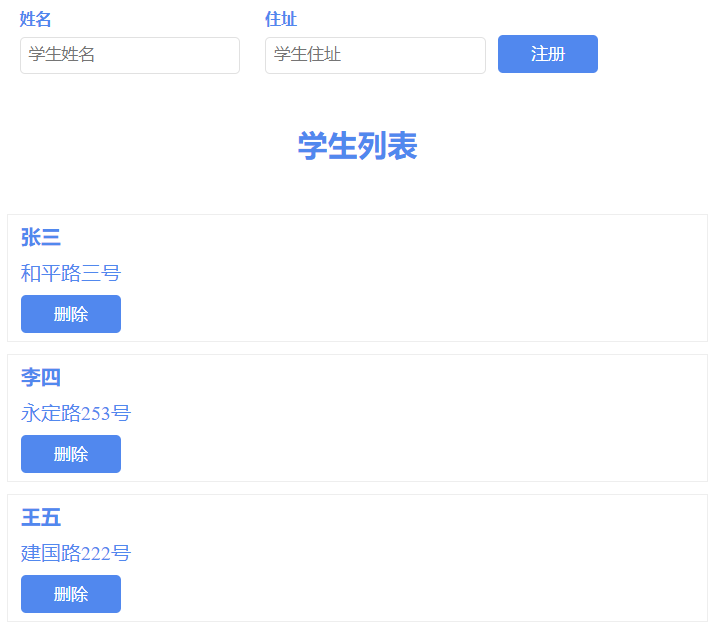
创建项目
运行如下命令:
npx create-react-app react-hooks-student-reg --template typescript
cd react-hooks-student-reg
yarn start
定义类型
在使用TS的时候,最重要的一步就是定义类型。首先创建src/typings/index.ts:
export interface IStudent {
    id: number;
    name: string;
    address: string
}

export interface IState {
    studentList: IStudent[];
}

export enum STUDENT_ACTION_TYPE {
    INIT = 'init',
    ADD = 'add',
    REMOVE = 'remove'
}

export interface IStudentAction {
    actionType: STUDENT_ACTION_TYPE;
    payload: IStudent | IStudent[] | number
}
定义操作类型的相关方法
添加文件src/reducers/StudentReducer.ts:
import { IState, IStudent, IStudentAction, STUDENT_ACTION_TYPE } from "../typings";

function studentReducer(state: IState, action: IStudentAction): IState {
    const { actionType, payload } = action;
    switch(actionType) {
        case STUDENT_ACTION_TYPE.INIT:
            // 注意:{...state, studentList: xxx}这种写法的含义是:展开state所有属性,
            // 同时更新其中的studentList属性
            return {
                ...state,
                studentList: payload as IStudent[]
            }
        case STUDENT_ACTION_TYPE.ADD:
            return {
                ...state,
                studentList: [...state.studentList, payload as IStudent]
            }
        case STUDENT_ACTION_TYPE.REMOVE:
            return {
                ...state,
                studentList: state.studentList.filter(student => student.id !== payload as number)
            }
        case STUDENT_ACTION_TYPE.UPDATE:
            const {id, name, address} = payload as IStudent;
            return {
                ...state,
                studentList: state.studentList.map(stu => {
                    return stu.id === id? {
                        ...stu,
                        name,
                        address
                    }: {
                        ...stu
                    }
                })
            }
        default:
            return state;
    }
}

export {
    studentReducer
}
实现注册功能组件
添加文件src/components/Student/Registration.ts:
import { useRef, FC, ReactElement } from 'react';
import { IStudent } from '../../typings';

interface IProps {
    addStudent: (student: IStudent) => void;
    studentList: IStudent[];
}

const Registration: FC<IProps> = ({
    addStudent,
    studentList
}): ReactElement => {

    const nameRef = useRef<HTMLInputElement>(null);
    const addressRef = useRef<HTMLInputElement>(null);

    const add = (): void => {
        const name: string = nameRef.current!.value.trim();
        const address: string = addressRef.current!.value.trim();
        if(name.length > 0 && address.length > 0) {
            const isExist = studentList.find(stu => stu.name===name && stu.address===address)
            if(isExist) {
                alert("重复数据");
                return;
            }else{
                addStudent({
                    id: new Date().getTime(),
                    name: name,
                    address: address
                })
                nameRef.current!.value = '';
                addressRef.current!.value = '';
            }
        }else{
            alert("请输入姓名和住址");
        }
    }

    return(
        <>
            <div className="field">
                <label>姓名</label>
                <input ref={ nameRef } type="text" placeholder="学生姓名" id="name"/>
            </div>
            <div className="field">
                <label>住址</label>
                <input ref={ addressRef } type="text"  placeholder="学生住址" id="address"/>
            </div>
            <button onClick = { add }>注册</button>
        </>
    )
}

export default Registration;
学生列表组件
添加文件src/components/List.ts:
import { FC } from 'react';
import { IStudent } from "../../typings";
import SingleStudent from "./SingleStudent";

interface IProps {
    studentList: IStudent[];
    removeStudent(id: number): void;
}

const List: FC<IProps> = ({ studentList, removeStudent }) => {
    return(
        <>
            <h2>学生列表</h2>
            <ul>
            {
                studentList.map((student: IStudent) => {
                    return <SingleStudent key={student.id} student={student} removeStudent={removeStudent}/>
                })
            }
            </ul>
        </>
    )
}

export default List;
单一学生组件
添加文件src/components/Student/SingleStudent.tsx:
import { FC } from 'react';
import { IStudent } from "../../typings";

interface IProps {
    student: IStudent;
    removeStudent(id: number): void;
}

const SingleStudent: FC<IProps> = ({
    student,
    removeStudent
}) => {
    const { id, name, address } = student;

    return(
        <li>
            <h4>{name}</h4>
            <p>{address}</p>
            <p><button onClick={() => removeStudent(id)}>删除</button></p>
        </li>
    )
}

export default SingleStudent;
入口页面
添加文件src/components/Student/index.tsx:
import { useEffect, useReducer } from 'react';
import Registration from './Registration';
import List from './List';
import { IStudent, IState, STUDENT_ACTION_TYPE } from '../../typings';
import { studentReducer } from '../../reducers/StudentReducer';

const initialState: IState = {
  studentList: []
}

function Index() {
  const [state, dispatch] = useReducer(studentReducer, initialState);

  // 用于初始化
  useEffect(() => {
    const studentList = JSON.parse(localStorage.getItem('studentList') || '[]');
    dispatch({
      actionType: STUDENT_ACTION_TYPE.INIT,
      payload: studentList
    })
  }, []);

  // 用于监测studentList的变化,并保存在localStorage
  useEffect(() => {
    localStorage.setItem('studentList', JSON.stringify(state.studentList));
  }, [state.studentList]);

  const addStudent = (student: IStudent) => {
    dispatch({
      actionType: STUDENT_ACTION_TYPE.ADD,
      payload: student
    })
  }

  const removeStudent = (id: number) => {
    dispatch({
      actionType: STUDENT_ACTION_TYPE.REMOVE,
      payload: id
    })
  }

  return (
    <div className="wrapper">
      <Registration studentList = {state.studentList} addStudent = { addStudent } />
      <List studentList = {state.studentList} removeStudent = {removeStudent}/>
    </div>
  );
}

export default Index;
App.tsx
import './App.css';
import StudentIndex from './components/Student';

function App() {

  return (
    <>
      <StudentIndex/>
    </>
  );
}

export default App;